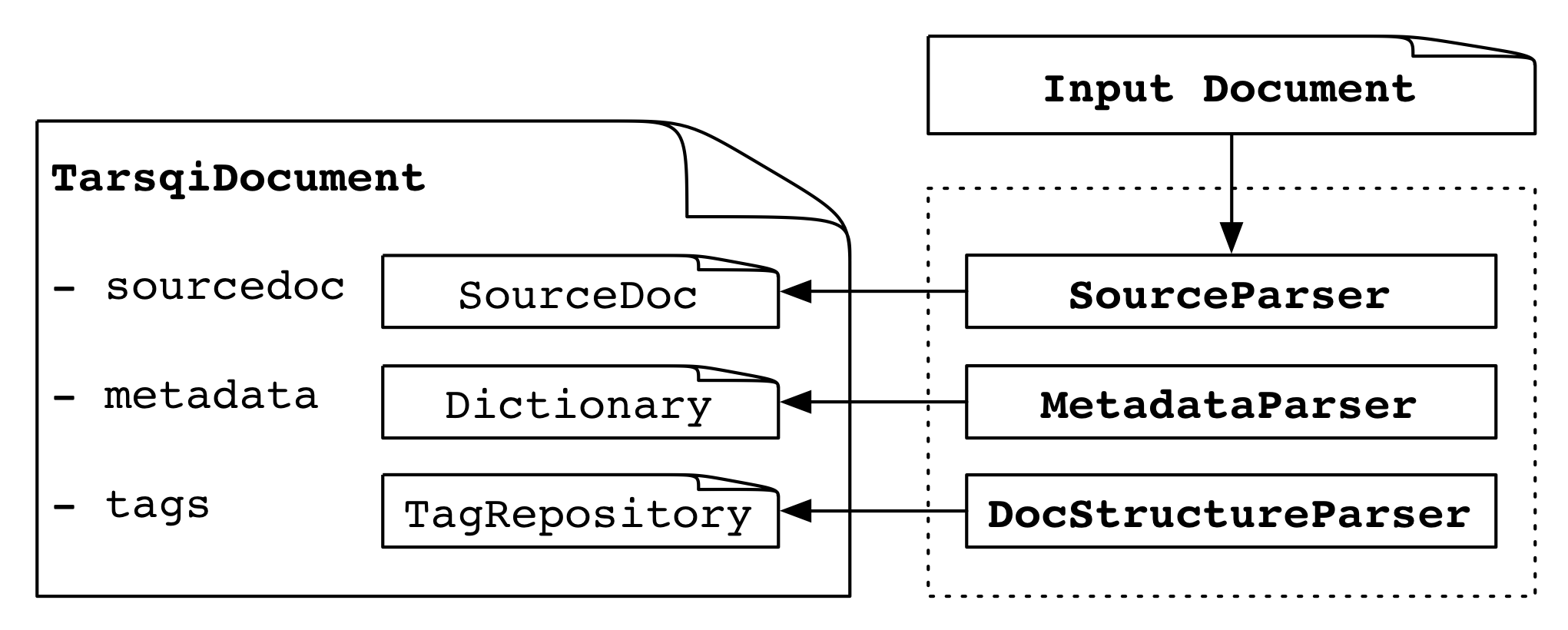
The top-level processing chain is implemented in the run_tarsqi() method and the Tarsqi class in tarsqi.py. The run_tarsqi() method reads the arguments, deals with some file/directory bookkeeping, and initializes a Tarsqi instance and then runs the process_document() method on the instance. Upon initialization the Tarsqi instance does the following:
There is an instance of the Tarsqi class for each document processed. Actual processing occurs through the Tarsqi.process_document() method which does the following things:
We will discuss most of these steps in some more detail, but let's first take a look at the structure of the TarsqiDocument object since it is central to a lot of the processing in the Tarsqi toolkit. The four main elements of a TarsqiDocument are shown in the table below.
| docmodel.document.TarsqiDocument | |
| sourcedoc | an instance of docmodel.document.SourceDoc |
| metadata | a dictionary with meta data |
| options | an instance of tarsqi.Options containing processing options |
| tags | an instance of docmodel.document.TagRepository, tags are added here by the Tarsqi components |
The TarsqiDocument is created during Tarsqi initialization. In step 1 above, the SourceParser adds a SourceDoc, the MetadataParser sets values in a meta data dictionary and the DocSructureParser adds docelement tags to a tag repository in tags. Application of pipeline components (step 2) changes the tags repository by adding new tags.
The SourceDoc instance has the following structure:
| docmodel.document.SourceDoc | |||||||||
| filename | the file that the SourceDoc is created for | ||||||||
| text | a unicode string | ||||||||
| metadata | a dictionary with the metadata expressed in the source document | ||||||||
| comments | a dictionary of comments in the source documents, indexed on text offset of the comment; currently, these comments are always XML comments | ||||||||
| tags |
|
||||||||
We now turn to how the three parsers of step 1 operate and how they fill in the TarsqiDocument and SourceDoc structures.
SourceParser. When the source parser applies, the main variables on the TarsqiDocument (source, metadata, options and tags) are not filled in yet. As the first part of step 1, the TarsqiDocument is processed by one of the subclasses of docmodel.source_parser.SourceParser. These classes parse the input file using parse_file(filename) and build the embedded SourceDoc instance in the source variable.
Three subclasses of SourceParser are defined: SourceParserXML, SourceParserText and SourceParserTTK. Which one is picked depends on the --source option, which has 'xml' as the default. There is a dictionary in docmodel.main that maps the source to a source parser and to a metadata parser and the function create_source_parser() is used in the tarsqi module to get this parser.
docmodel.main

PARSERS = {
    'xml': (SourceParserXML, MetadataParser),
    'timebank': (SourceParserXML, MetadataParserTimebank),
    'text': (SourceParserText, MetadataParserText),
    'ttk': (SourceParserTTK, MetadataParserTTK) }
As an aside, note that with these source types we can split a processing chain by storing intermediate results and then later applying components further downstream. In the code below for example we take an XML file and just run the preprocessor. Results are always stored in Tarsqi's native ttk format which is then used as the source format for the next invocation with the rest of the pipeline.
python tarsqi.py --pipeline=PREPROCESSOR --source=xml test.xml test-p.xml
python tarsqi.py --pipeline=EVITA,SLINKET --source=ttk test-p.xml test-pge.xml
Back to document parsing. On Tarsqi initialization, the method create_source_parser() was used to set the value of the source_parser variable of the Tarsqi instance. And this parser is used by the Tarsqi.process_document() method, a fragment of which is shown here.
tarsqi.Tarsqi

def process_document(self):
    self.source_parser.parse_file(self.input, self.tarsqidoc)
    self.metadata_parser.parse(self.tarsqidoc)
    self.docstructure_parser.parse(self.tarsqidoc)
    for (name, wrapper) in self.pipeline:
        self._apply_component(name, wrapper, self.tarsqidoc)
When we use --source=xml on the command line then self.source_parser contains an instance of SourceParserXML and the input is assumed to be an XML file with inline XML tags which the source parser splits into the primary text data (text without tags) and a dictionary of class TagRepository which has tags with character offsets pointing into the primary data. Both instance variables are intended to be read-only. That is, after the SourceDoc is created the primary data string never changes and tags are not added to the TagRepository. Here is a minimal example as an illustration:
<?xml version="1.0" ?>
<text>One <noun>tag</noun> only.</text>
For this text, the tags list is as follows:
[ <docmodel.source_parser.Tag instance at 0x108d6c518>,
  <docmodel.source_parser.Tag instance at 0x108d6c4d0> ]
For clarity, here is the same list but with the unhelpful print string for Tags replaced by a more helpful one:
[ <Tag text id=1 1:14 {}>,
  <Tag noun id=2 5:8 {}> ]
The dictionaries on the two tags are empty, but if the XML tags had attributes they would end up in there. The two other instance variables on TagRepository are in effect indexes over the list, giving quick access to the tags at specified begin or end offsets. The opening tags dictionary is as follows:
{ 1: [ <Tag text id=1 1:14 {}> ],
  5: [ <Tag noun id=2 5:8 {}> ] }
Which indicates that there are opening tags at positions 1 and 5, and in both
cases there is only one tag at that offset. Instances of Tag contain the name of
the tag, its attributes and its begin and end offsets. The closing tags
dictionary for the above example is:
{  8: { 5: {u'noun': True} },
  14: { 1: {u'text': True} } }
This dictionary says that at character offset 8 we close a noun tag that was opened at offset 5. The TagRepository class has convenience methods to access tags.
The two other source parsers, SourceParserText and SourceParserTTK, add a SourceDoc instance to the TarsqiDocument, just as SourceParserXML does. The SourceParserText justs puts a string in the text variable and leaves all others empty. The SourceParserTTK however is used to deal with documents that were previsously saved as a TTK document and which may contain metadata, source tags and Tarsqi tags. Therefore, this parser adds elements to the metadata dictionary on the SourceDoc, source tags to the tags repository on the SourceDoc, and Tarsqi tags to the tags repository on the TarsqiDocument (and in some cases to the comments variable as well if the TTK document was created from an XML document with comments).
MetadataParser. The second part of step 1 is to run a metadata parser, all metadata parsers are defined in docmodel.metadata_parser. Again, what metadata parser to use is determined by the --source command line option and the mapping in the PARSERS dictionary in docmodel.main.
For generic XML we can use the default MetadataParser which takes a TarsqiDocument and fills in elements in its metadata dictionary. In fact, it only fills in one element, the Document Creation Time (DCT) which is added under the 'dct' key. To see how this works recall the process_document() method in the Tarsqi class, repeated here with the call to the metadata parser in bold face.
tarsqi.Tarsqi

def process_document(self):
    self.source_parser.parse_file(self.input, self.tarsqidoc)
    self.metadata_parser.parse(self.tarsqidoc)
    self.docstructure_parser.parse(self.tarsqidoc)
    for (name, wrapper) in self.pipeline:
        self._apply_component(name, wrapper, self.tarsqidoc)
All metadata parsers define a parse() method, which in the case of the MetadataParser simply sets the DCT to today's date, which is what get_today() returns:
docmodel.metadata_parser.MetadataParser

def parse(self, tarsqidoc):
    tarsqidoc.metadata['dct'] = self.get_dct()

def get_dct(self):
    return get_today()
There are other metadata parsers with different approaches to getting the DCT. For example, the MetadataParserTimebank extracts certain xml elements from the document or parses the name of the input file. Any piece of code could be inserted in the parse() method and the DCT can be extracted using a full document parse or a database lookup if needed. Note that the metadata parser has access to the TarsqiDocument and its embedded SourceDoc, metadata and processing options. As for the options, the processing options are taken from the command line options and the config.txt file. Therefore, any settings there are available to the metadata parser simpy by using something like the following:
def parse(self, tarsqidoc):
    dct_db = tarsqidoc.options.getopt('dct-database')
    tarsqidoc.metadata['dct'] = lookup(tarsqidoc.source.filename, dct_db)
This piece of code assumes that 'dct-database' was given as a command line option (for example, "--dct-database=/home/databases/dct.sqlite") or was added to config.txt, it also requires that lookup() is defined appropriately.
DocumentStructureParser. The third and last part of step 1 is to apply the document parser. We again print the relevant code, this time with the document parser invocation highlighted.
tarsqi.Tarsqi

def process_document(self):
    self.source_parser.parse_file(self.input, self.tarsqidoc)
    self.metadata_parser.parse(self.tarsqidoc)
    self.docstructure_parser.parse(self.tarsqidoc)
    for (name, wrapper) in self.pipeline:
        self._apply_component(name, wrapper, self.tarsqidoc)
There is a simple default document parser named DocumentStructureParser defined in docmodel.docstructure_parser. This parser first checks whether document structure is already available in the form of docelement tags in the tags repository on the TarsqiDocument (which would happen if the input is a ttk file). If not, the parser finds the offsets of paragraph boundaries using white lines as a heuristic. These offsets are then used to add docelement tags to the tags repository on the TarsqiDocument. This simple parsers only adds docelement tags of type "paragraph", but future versions may also add other types like "section-header".
Pipeline processing starts off from the same spot in the code as the parsers described above:
tarsqi.Tarsqi

def process_document(self):
    self.source_parser.parse_file(self.input, self.tarsqidoc)
    self.metadata_parser.parse(self.tarsqidoc)
    self.docstructure_parser.parse(self.tarsqidoc)
    for (name, wrapper) in self.pipeline:
        self._apply_component(name, wrapper, self.tarsqidoc)
This applies all components as specified in the pipeline. Recall that on initialization the Tarsqi class creates a pipeline of components from the user's --pipeline option. If we had used a command line invocation like
$ python tarsqi.py --pipeline=PREPROCESSOR,GUTIME,EVITA in.xml out.xml
then the pipeline as stored on the pipeline variable in the Tarsqi instance would be
[('PREPROCESSOR', <class components.preprocessing.wrapper.PreprocessorWrapper at 0x10514a668>),
 ('GUTIME', <class components.gutime.wrapper.GUTimeWrapper at 0x1051c36d0>),
 ('EVITA', <class components.evita.wrapper.EvitaWrapper at 0x1051c3ce8>)]
The code for all components is wrapped in special wrapper classes like PreprocessorWrapper in the example above. All available wrappers are defined in the COMPONENTS dictionary in components.__init__.py. Every wrapper is required to have the following two methods:
Components update the TarsqiDocument by updating its TagRepository. In some cases, another data structure is updated first and then the results are exported to the TarsqiDocument.
The Tarsqi class prints results by asking the TarsqiDocument to print the source text and all tags to a document, which in turn is done by retrieving the source and the source tags from the SourceDoc instance and the added Tarsqi tags from the TagRepository in the tarsqi_tags attribute. The output is written to one file with both the primary data and the tags. Here is an example of an output file that the Tarsqi toolkit produces. Suppose we have the input below.
<?xml version="1.0" ?>
<text>He sleeps on Friday.</text>
And suppose we have a pipeline that includes the preprocessor, GUTime and Evita. Then the output will be as follows (note that in real life the EVENT tag would actually be printed on one line only, it is split over two lines here for readability).
<ttk>
<text>
She sleeps on Friday.
</text>
<metadata>
  <dct value="20160907"/>
</metadata>
<source_tags>
  <text id="1" begin="1" end="22" />
</source_tags>
<tarsqi_tags>
  <docelement id="d1" begin="0" end="23" origin="DOCSTRUCTURE" type="paragraph" />
  <s id="s1" begin="1" end="22" origin="PREPROCESSOR" />
  <lex id="l1" begin="1" end="4" lemma="she" origin="PREPROCESSOR" pos="PP" text="She" />
  <ng id="c1" begin="1" end="4" origin="PREPROCESSOR" />
  <lex id="l2" begin="5" end="11" lemma="sleep" origin="PREPROCESSOR" pos="VBZ" text="sleeps" />
  <vg id="c2" begin="5" end="11" origin="PREPROCESSOR" />
  <EVENT begin="5" end="11" aspect="NONE" class="OCCURRENCE" eid="e1" eiid="ei1"
         epos="VERB" form="sleeps" origin="EVITA" pos="VBZ" tense="PRESENT" />
  <lex id="l3" begin="12" end="14" lemma="on" origin="PREPROCESSOR" pos="IN" text="on" />
  <lex id="l4" begin="15" end="21" lemma="Friday" origin="PREPROCESSOR" pos="NNP" text="Friday" />
  <ng id="c3" begin="15" end="21" origin="PREPROCESSOR" />
  <TIMEX3 begin="15" end="21" origin="GUTIME" tid="t1" type="DATE" value="" />
  <lex id="l5" begin="21" end="22" lemma="." origin="PREPROCESSOR" pos="." text="." />
  <TLINK eventInstanceID="ei1" origin="BLINKER-Type-2-on" relType="IS_INCLUDED" relatedToTime="t1" />
  <TLINK origin="LINK_MERGER" relType="INCLUDES" relatedToEventInstance="ei1" timeID="t1" />
</tarsqi_tags>
</ttk>
All elements added by Tarsqi processing, with the exception of meta data elements like the DCT, are direct children of the tarsqi_tags tag. There is no strictly defined order, but in general textual occurrence is used for ordering.
All Tarsqi tags added by the system have identifiers that are unique to the document and the tag type. The identifiers consist of a tag-specific prefix and an integer. The prefixes and the tags they go with are listed in the table below.
| tag with identifier example | component | description |
| <docelement id="d1"> | DocumentStructureParser | paragraphs |
| <s id="s1"> | Tokenizer | sentences |
| <lex id="l12"> | Tokenizer and Tagger | tokens with pos and lemma |
| <ng id="c1"> | Chunker | noun chunks |
| <vg id="c2"> | Chunker | verb chunks |
| <TIMEX3 tid="t3"> | GUTime | TimeML time expressions |
| <EVENT eid="e23" eiid="ei23"> | Evita | events |
| <ALINK lid="l31"> | Slinket | aspectual links |
| <SLINK lid="l32"> | Slinket | subordinating links |
| <TLINK lid="l33"> | Blinker, S2T, classifier | temporal links |
Tags introduced by the document structure parser and the preprocessor have lower case names and use the "id" attribute for the identifiers. TimeML tags are uppercase and introduce their identifiers with special attributes "tid", "eid", "eiid", and "lid". Identifiers of noun chunks and verb chunks share the same prefix and so do th eidentifiers on the three link types. As per the TimeML specifications, events have an event identifier and an event instance identifier, this allows us to deal with those events that have more than one instance. The latter case is not recognized by the Tarsqi Toolkit however and the eid and eiid will always have the same integer in it (but not with the same prefix).